Review on Data File Processing * (not for Spring 2026)
Example: Create a text file called users.txt that stores a list of user passwords. Then create a login form to validate users against the file. Of course, you should have an exit button that allows the user to unload the application in case of failure to login in.
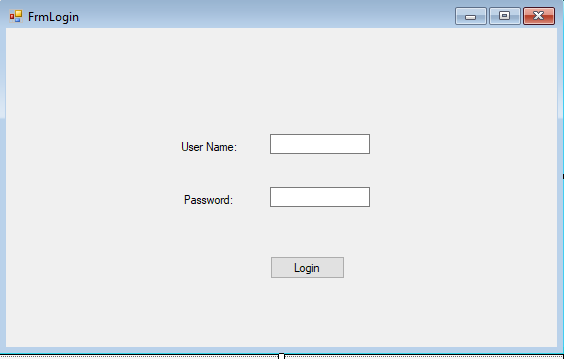
To follow VCM model (see later chapters), the UI class should only focus on handling user actions, and actual validation should be handled over to a control class. Here we will create a control class, called User, which will have three properties and one function as follows:
Using System.IO;
public class User
{
string uid, pwd, role;
public string UID
{
get
{
return uid;
}
set
{
uid = value;
}
}
public bool Validate(string u, string p)
{
StreamReader myReader = File.OpenText(@"E:\users.txt");
string aLine;
string[] acct;
aLine = myReader.ReadLine();
bool isFound = false;
while (aLine != null && isFound == false)
{
acct = aLine.Split(',');
if (u == acct[0].Trim() && p == acct[1].Trim())
{
isFound = true;
uid = u;
break;
}
else
{
aLine = myReader.ReadLine();
}
}
myReader.Close();
return isFound;
}
}
Then, let us program the login button. First, when login succeeds, we will open up the main form, called Form1. For inter-form communication, e.g., sending data from one form to another, or remotely call another form to perform a function, we create a special property, called instance, in Form1 as follows:
static Form1 instance;
public static Form1 Instance
{
get
{
return instance;
}
set
{
instance = value;
}
}
We also create a label, called lblLoginUser, in Form1, and a function, called ShowLoginUser() in Form1, so that the login button can send login user name to Form1, and remotely called ShowLoginUser() function to show the user name:
public void ShowLoginUser(string u)
{
lblLoginUser.Text = "Login User: " + u;
}
Now, we can program the login button as follows:
private void btnLogin_Click(object sender, EventArgs e)
{
User user = new User();
if(user.Validate(txtU.Text, txtP.Text) == true)
{
Form1.Instance = new Form1();
Form1.Instance.ShowLoginUser(user.UID);
Form1.Instance.Show();
FrmLogin.instance.Hide();
}
else
{
MessageBox.Show("Your user name or password or both are invalid.");
}
}
Lecture 1: Object Orientation
Note: For Spring 2006 and after, coding will be changed to Python but concepts and models of objects and classes stay.
- Three concepts of objects and classes
- Real World: each dog is an object, the group of all dogs is class Dog
- Model: a rectangle box with label like :Dog, for a conceptual object and a rectangle box with three compartments with name Dog, attributes of a dog, and behaviors of a dog respectively
- Programming: "class Dog {...}" is the code for Dog class and "Dog myPuppy = new Dog();" is how to create a dog object myPuppy
- How to model real world objects and classes: make sure to know the differences between attributes and operations
- Criterion for Capturing Attributes: relevance (no more single value requirements as in data modeling)
- Criterion for Capturing Operations:
- Process object data
- Make objects smart or capable or autonomous
- support use cases (later in the course)
- How to write operations:
- data flow diagramming
- data flow reductions
- Accessibility Scope: Private, Public, Protected
- Advanced Concepts*:
- static attributes and operations
- abstract operations and classes
- Complete Examples:
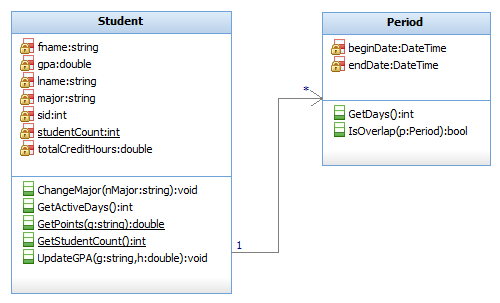
- Students with active periods as attributes and an operation to find active days
- Accounts with operations to credit and debit
- Employees with operation to update salaries
Python Coding Examples:
- Dog with name, breed, and birth date as data and Bark(), Greeting(), and GetAge() as operations (Testing: create three dog instances to test data members and operations)
- BankAccount with account number, balance, and type as data members and Deposit() and Withdraw() as operations (Testing: create two account instances to test withdraw and deposit)
- Rectangle with width and height as data members and Area() and Perimeter as operations (Testing: create two shapes to compute area and perimeters)
- Circle shape with radius as data and Area() and Circumference() as operations
- Student with sid, sname, major, gpa, and birth date as instance data members and school and student count as class-level static data, and getGPA(), getMajor(), ChangeMajor(newMajor) as instance operations and GetSchool() and GetStudentAcount() as class-level static operations (Testing: create three student instances, to test instance operations and static operations)
Create a simple Dog class
Create a class Dog with attributes:
Include methods:
Create a Student class
Create a class Student with attributes:
Include methods:
Create a Rectangle class
Create a class Rectangle with attributes:
Include methods:
Create a BankAccount class
Create a class BankAccount with attributes:
Include methods:
-
deposit(amount) → adds money
-
withdraw(amount) → subtracts money if enough balance, otherwise returns "Insufficient funds"
C# Implementation (not for Spring 2026)
public class Student
{
private int sid;
private string lname;
private string fname;
private string major;
private DateTime birthDate;
private double gpa;
private double totalCreditHours;
private Period[] activePeriods;
//Private List activePeriods;
private static int studentCount;
public void ChangeMajor(string nMajor)
{
major = nMajor;
}
public static double GetPoints(string g)
{
switch(g)
{
case "A":
return 4.0;
case "B":
return 3.0;
case "C":
return 2.0;
case "D":
return 1.0;
default:
return 0.0;
}
}
public static int GetStudentCount()
{
return studentCount;
}
public void UpdateGPA(string g, double h)
{
double pts = gpa * totalCreditHours;
pts = pts + h * Student.GetPoints(g);
totalCreditHours = totalCreditHours + h;
gpa = pts / totalCreditHours;
}
public int GetActiveDays()
{
int sum = 0;
foreach (Period p in activePeriods)
{
sum = sum + p.GetDays();
}
return sum;
}
}
public class Period
{
private DateTime beginDate;
private DateTime endDate;
public int GetDays()
{
TimeSpan ts = endDate - beginDate;
return ts.Days;
}
}
Homework:
Reading: Chapter 5 of LIU (2020)
Writing:
- Correctness Questions: online;
- Hands-on Questions: create classes below as specified and use each to create two or three instance objects to test the workings of the operations. Print out your screenshot of your code and testing to submit.
Create a Book class
Create a class Book with attributes:
Include methods:
Create a Car class
Create a class Car with attributes:
Include methods:
Create a Circle class
Create a class Circle with attribute:
Include methods:
Create a Laptop class
Create a class Laptop with attributes:
Include methods:
Create a Movie class
Create a class Movie with attributes:
Include methods:
Create a Counter class
Create a class Counter with attribute:
Include methods:
|