Welcome to Systems Analysis and Design! To get started with the course, here is a list of basic necessities:
- The textbook, entitled "Requirements Modeling and Coding" by Dr. Liping Liu (ISBN: 978-1786348821),World Scientific Pub Co Inc., 2020, is required.
- UA Zip ID, via which you can access campus resources such as downloading licensed software (e.g., visual studio at https://azureforeducation.microsoft.com/devtools) or accessing campus systems (e.g., brightspace.uakron.edu).
- OpenAI API Key: Go to https://platform.openai.com/api-keys and create an API key. You may need to create an account first. The key is a long series of characters. Save it to a jump drive or your email. You will need use the key for lessons and assignments. You may need to pay a small amount of money (ten dollars are sufficient) if you have exhausted the free credit for a new user.
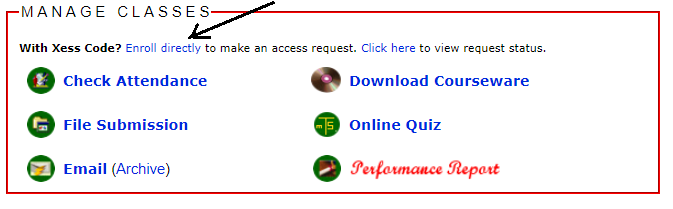
- Student Account at ecourse.org (go to https://www.ecourse.org to signup for one if you don't have one yet), via which you can manage your assignments, download course materials, take exams, track performance, and access a lot of learning resources. After signup and login, you can use Xess code VZR35NEFS3 to connect to your course using the link "Enroll Directly" (see below)
Due to the hands-on nature of the course, a good computer with Windows 11 operating system and at least 8GB RAM, 256GB hard drive, and Pentium i5 CPU. If you are using Mac computer, you can install Parallel software to allow dual booting to Windows. The following software must be installed:
- Microsoft Visual Studio 2019 (follow https://ecourse.org/news.asp?which=5040 for installation instructions and make sure you include Desktop Development with C++ ).
-
Download Langflow Desktop from https://www.langflow.org/desktop. Make sure you install C++ compiler (Visual Studio with C++) before this and stop Anti-Virus program before running the program for the first time to set up. In case of errors during the setup, open Windows Power Shell as Administrator and run the command "Set-ExecutionPolicy Unrestricted -Scope LocalMachine -Force" in the Power Shell command line. Then run the downloaded msi file to install Langflow Desktop again and run the setup.
- IBM Rhapsody 8 (follow https://ecourse.org/news.asp?which=1848 to download and install)
C# Video Tutorials
- Short Free Videos on Basic Visual C# Programming at eduonix.com: https://www.eduonix.com/courses/Software-Development/Learn-C-Sharp-Programming-From-Scratch (Recommended Use: watch the videos and follow the hands-on exercises along the videos)
- Short Tutorials on Visual C# Programming with Quiz Questions at TutorialsTeacher.com: https://www.tutorialsteacher.com/csharp (Recommended Use: take quizzes and tests to check your skills and understandings)
Tips for Success
- Practice, Practice, and Practice!
- Put your hands on class demonstrations
- Do assignments
- Apply the skills to your work or projects
- Don't give up; if assignments are challenging to you, so are they to all. Those who keep on trying will prevail.
- Don't procrastinate: Remember that you don't have more time after class or tomorrow.
- Get everything clear in class
- Finish assignments today
- If you take a class online, treat it as a regular one. Participate in live lectures in MS Teams, take notes, ask questions, report attendance, and submit homework on time.
- If you take a class online asynchronously, make sure you review the lecture recordings, take notes, and perform all class examples. Then wrap all your notes, completed class examples and programs into a zip file to submit to ecourse.org as your proof of attendance.
- Form a study group via Facebook, LinkedIn, etc. You may optionally include me into your groups (I didn't actively use Facebook before but can take it up if you need.
|