Hardware Requirements: A laptop or desktop with Windows 11 operating system and at least 8 GB RAM, 256 GB SSD hard drive, and Gen 12 or later Pentium i7 or i9 or equivalent ADM Ryzen 7 processors. Note: MacBook and iMac and some recent lightweight laptops that come with ARM processors may not support all the programs we use in classes.
Software Requirements:
Utilities:
- Java Development Kit: for compiling and running Java programs. Download from https://www.oracle.com/java/technologies/downloads/
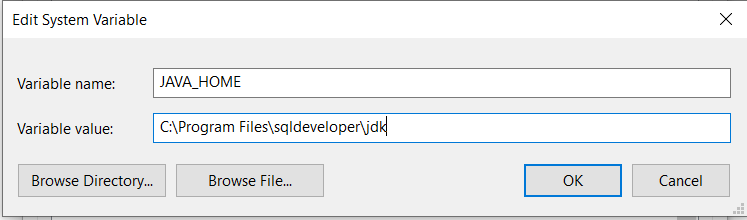
- Set up JAVA_HOME environment variable for your other programs to use Java. Download this file, extract JavaHomeVar.bat file, right click on the batch file to run as administrator. Alternatively, you can go to Control Panel => System => Advanced System Settings => Environment Variables, add a new or edit existing System Variable, called JAVA_HOME to point to your JDK location such as C:\Program Files\sqldeveloper\jdk. Then restart your computer (Follow https://www.ecourse.org/news.asp?which=5822 to add and change environment variables.)
Productivity Tools:
- Microsoft Office: purchase from Microsoft
- MS Word: viewing and editing Word documents
- MS Excel: for spreadsheet models and calculations
- MS PowerPoint for making presentations
- MS Office Professional Extensions:
Programs for Classes:
- Microsoft Visual Studio: for C# Programming. Download from https://azureforeducation.microsoft.com/devtools. follow https://ecourse.org/news.asp?which=5040 for installation instructions. Make sure to include the following components during the installation:
- ASP.NET and Web Development (plus Windows Communication Foundation services to be selected on the right part of the Workloads panel)
- .Net Desktop Development
- Desktop Development with C++

- Langflow Desktop: This is a low-code tool for developing AI agents. Download Langflow Desktop from https://www.langflow.org/desktop. Make sure you install C++ compiler (Visual Studio with C++), stop Anti-Virus program, and open Power Shell as Administrator and run the command "Set-ExecutionPolicy Unrestricted -Scope LocalMachine -Force" in the Power Shell command line. Then run the downloaded msi file to install Langflow Desktop and run the setup.
|